Separate operational and accounting records
Vehicle, service and parts teams produce different reports. Agree invoice references and ledger rules before combining their exports.
Automobile solutions
Bring vehicle sales, workshop, spare parts and branch accounting into a structured report-to-TallyPrime workflow. Review your DMS exports first, then configure the right combination of SDIS DMS, UiPrime and CBA.
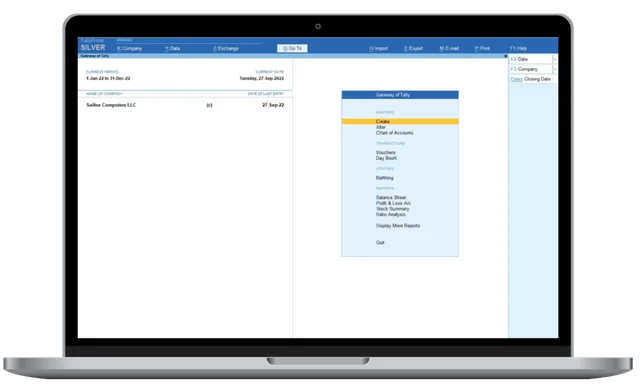 TallyPrimeConnected through SDIS




























Dealership solutions by brand
Explore your brand’s integration workflow and discover products for accounting, automation, ERP and people management.
Choose a product to explore its capabilities.
The work behind the numbers
Vehicle, service and parts teams produce different reports. Agree invoice references and ledger rules before combining their exports.
Daily portal and spreadsheet work can occupy accounts teams. Assess eligible UiPrime workflows and SDIS mapping before automating.
Keep branch identifiers visible in each export and discuss CBA reporting requirements across your locations.
Configured around your source reports
Agree the fields, voucher types and reporting requirements before moving from a sample import to regular processing.
Map invoice dates, customer ledgers, vehicle references, invoice values and tax columns from an available sales export.
Separate labour and parts lines, retain available job-card references and compare service invoice totals after a trial import.
Review item codes, units, quantities and tax fields for parts sales and purchases before enabling inventory mapping.
Agree claim references, ledger treatment and voucher types from your actual warranty reports; do not assume every claim is a sales entry.
Review file encoding, column layout and transaction identifiers. Keep separate templates for reports with different structures.
Validate mapped vouchers in a test company, then review regular accounting reports. Automation scope depends on the reports and enabled workflow.
Discuss location-level ledgers, branch attribution and consolidated CBA views where your business operates across branches.
One connected accounting journey
Select a stage to see its role. Optional automation and branch reporting are scoped to your business.
Start with the operational reports available to your accounts team. Keep order, invoice, item and location references.
Choose the report period and prepare an anonymised sample. Confirm columns, file format and source totals.
Assess repetitive report-download and Excel tasks. Include only enabled workflows confirmed for your system and access permissions.
Agree ledger, voucher, item and tax-field mapping. Validate required fields and trial results against the source files.
Import agreed entries into a test company first. Compare counts, amounts, taxes and inventory before regular accounting.
Retain branch identifiers and agree branch-level and consolidated reporting when your business requires it.
Stage 01 / 06
Start with the operational reports available to your accounts team. Keep order, invoice, item and location references.
Your dealership toolkit
Choose your TallyPrime edition, then explore solutions for dealership integration, approvals, remote access and customised workflows.
Single-user accounting for dealership billing, stock and everyday financial records.
Multi-user accounting for dealership teams working together on a local network.
Support your multi-user TallyPrime environment with server-based data management.
Map exported dealership reports into TallyPrime entries for sales, service and spare parts.
Bring branch accounts and consolidated financial visibility into your TallyPrime workflow.
Automate eligible report downloads and file preparation with configured workflows.
Explore Tally productivity tools suited to your accounting team and everyday reporting needs.
Review and approve vouchers through a structured accounting approval workflow.
Host your Tally workspace for authorised remote access by your dealership team.
Access hosted business applications through a remote desktop workspace.
Explore mobile access to your Tally business information while away from the dealership.
Adapt Tally workflows, reports and business processes to your dealership requirements.
Built for your everyday operations
Start with the work you want to simplify. Combine the right products for your accounts team, branches and remote users.
Organise invoices, stock and financial reporting around the way your dealership works.
Connect exported dealership reports with accounting, branch visibility and voucher review.
Explore hosted access, mobile information and tools tailored to your daily workflow.
Tell us your team size, current software and branch requirements. We’ll help you plan the right setup.
Bring Ashok Leyland dealership DMS exports into TallyPrime with mapping for available sales, service, spare-parts and tax reports.
Bring Audi dealership DMS exports into TallyPrime with mapping for available sales, service, spare-parts and tax reports.
Map available sales, purchase and stock reports from your Autopal business into configured TallyPrime entries.
Bring BMW dealership DMS exports into TallyPrime with mapping for available sales, service, spare-parts and tax reports.
Bring Eicher dealership DMS exports into TallyPrime with mapping for available sales, service, spare-parts and tax reports.
Map available sales, purchase and stock reports from your Ensol business into configured TallyPrime entries.
Bring Ford dealership DMS exports into TallyPrime with mapping for available sales, service, spare-parts and tax reports.
Bring Hero dealership DMS exports into TallyPrime with mapping for available sales, service, spare-parts and tax reports.
Bring Honda Bike dealership DMS exports into TallyPrime with mapping for available sales, service, spare-parts and tax reports.
Bring Honda dealership DMS exports into TallyPrime with mapping for available sales, service, spare-parts and tax reports.
Bring Hyundai dealership DMS exports into TallyPrime with mapping for available sales, service, spare-parts and tax reports.
Bring Jaguar dealership DMS exports into TallyPrime with mapping for available sales, service, spare-parts and tax reports.
Bring JCB dealership DMS exports into TallyPrime with mapping for available sales, service, spare-parts and tax reports.
Bring Jeep dealership DMS exports into TallyPrime with mapping for available sales, service, spare-parts and tax reports.
Bring Kia dealership DMS exports into TallyPrime with mapping for available sales, service, spare-parts and tax reports.
Bring Land Rover dealership DMS exports into TallyPrime with mapping for available sales, service, spare-parts and tax reports.
Bring Mahindra dealership DMS exports into TallyPrime with mapping for available sales, service, spare-parts and tax reports.
Bring Maruti Suzuki dealership DMS exports into TallyPrime with mapping for available sales, service, spare-parts and tax reports.
Bring MG dealership DMS exports into TallyPrime with mapping for available sales, service, spare-parts and tax reports.
Bring Renault dealership DMS exports into TallyPrime with mapping for available sales, service, spare-parts and tax reports.
Bring Royal Enfield dealership DMS exports into TallyPrime with mapping for available sales, service, spare-parts and tax reports.
Bring Skoda dealership DMS exports into TallyPrime with mapping for available sales, service, spare-parts and tax reports.
Bring Tata dealership DMS exports into TallyPrime with mapping for available sales, service, spare-parts and tax reports.
Bring Toyota dealership DMS exports into TallyPrime with mapping for available sales, service, spare-parts and tax reports.
Bring TVS dealership DMS exports into TallyPrime with mapping for available sales, service, spare-parts and tax reports.
Bring VinFast dealership DMS exports into TallyPrime with mapping for available sales, service, spare-parts and tax reports.
Bring Volkswagen dealership DMS exports into TallyPrime with mapping for available sales, service, spare-parts and tax reports.
Bring Volvo dealership DMS exports into TallyPrime with mapping for available sales, service, spare-parts and tax reports.
Bring Yamaha dealership DMS exports into TallyPrime with mapping for available sales, service, spare-parts and tax reports.
Before you get started
Start with your report formats and accounting needs. SDIS handles configured report imports, UiPrime covers eligible repetitive tasks, TallyPrime provides accounting and CBA is assessed where branch reporting is relevant.
The described workflows use exported reports and configured templates. Direct connections or real-time synchronization require separate technical assessment.
Our team reviews anonymised sample files, required fields and your Tally version. Trial entries are compared with source counts and totals before regular processing.
We assess enabled UiPrime tasks and branch identifiers first. CBA reporting is scoped where branch-level and consolidated views are needed.
Let’s review your workflow
Tell us which reports you use, how your accounting works and what your team repeats every day.
Prepare your Tally version and anonymised sample exports for the follow-up discussion.
Share your business details and requirements with our team. We’ll help you choose the right solution.