Quick navigation
The best multi-branch accounting software is the one that gives head office a consolidated view without making every branch learn a new system. For a few branches, TallyPrime with group companies is often enough. When you need live consolidated numbers, automatic inter-branch reconciliation and branch-level access control, a centralized branch accounting layer on TallyPrime or a full ERP is the better fit.
Priyam Infosystems sells TallyPrime and builds Centralized Branch Accounting. We cover all four approaches and say when ours is not the right one.
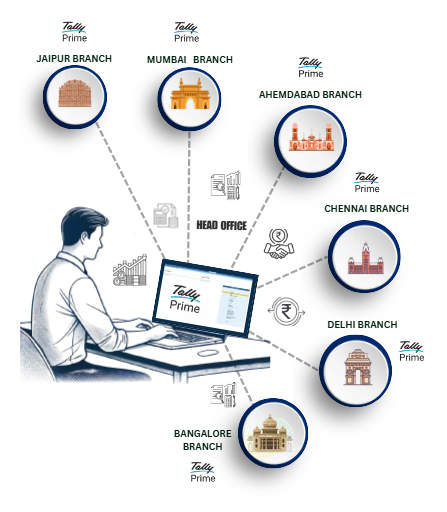
What multi-branch accounting has to solve
When a business opens a second location, three problems appear within months. Head office cannot see the whole company's numbers until someone merges spreadsheets. Branches move stock and money between each other, and the two sides rarely match. And every state needs its own GST registration and returns.
Good multi-branch accounting solves four things:
- One consolidated view of profit, balance sheet, stock and outstanding across all branches.
- Branch-wise books and reports, so each manager is accountable for their own numbers.
- Clean inter-branch transactions, where a transfer from one branch is recorded once and matched on the other side.
- Correct GST per registration, because branches in different states file separately.
Four ways to manage branch accounts
| Approach | How it works | Good for | Limits |
|---|---|---|---|
| A. One TallyPrime company with several GSTINs | One data file holds all branches. Reports are filtered by branch using cost centres and godowns. | Few branches under one head office team | One file grows large. Branches in other cities need remote access. |
| B. One company per branch, joined with a Group Company | Each branch keeps its own books. A Group Company in TallyPrime combines them into consolidated reports. | Branches that need separate books and returns | Member companies need uniform ledgers and masters. Inter-branch matching is mostly manual. |
| C. Centralized Branch Accounting on TallyPrime | Branches keep working in familiar TallyPrime screens while data is centralized for head office. | Many branches, live consolidation and strong control | An extra layer to set up and support through a partner. |
| D. A full ERP such as ERPNext or SAP Business One | One system for accounts, stock, sales, purchase and often more. | Businesses that also need production, CRM or HR in one platform | Higher cost and effort. Teams must learn a new system. |
How TallyPrime consolidates branch accounts
Tally Solutions describes TallyPrime's Group Company feature as the built-in way to consolidate several companies. It combines ledgers, trial balances and final accounts without manual merging. It also says TallyPrime supports multiple GSTINs within one company, and that one company per GSTIN is another practical method. Both are valid. The right pick depends on how independent each branch needs to be.
Which setup fits your branches?
Start with how often head office needs consolidated figures and how often branches transfer stock or funds. Monthly reporting across a few branches is a different job from matching daily transfers across a growing network. As you compare the setups below, account for branch access, remote connectivity, training, licences and ongoing support. Confirm the GST setup with your CA.
| Your situation | Approach to consider |
|---|---|
| Two or three branches with one accounts team | One TallyPrime company or separate companies with a Group Company |
| Branches keep separate books and head office reviews monthly totals | TallyPrime Group Company |
| Branches make daily transfers and head office needs live figures | Centralized Branch Accounting on TallyPrime |
| The business needs accounting alongside production, CRM or HR | A full ERP |
Centralized Branch Accounting on TallyPrime
Priyam's Centralized Branch Accounting (CBA) gives head office a shared view of the business while branch teams continue working in TallyPrime.
-
Live financial data
See figures across all branches as they update.
-
Inter-branch reconciliation
Match branch transfers automatically.
-
Role-based access
Give branch managers access to their own books while head office sees the group view.
-
GST consolidation
Review figures across multiple GSTINs.
-
Receivables and payables
Track outstanding balances in one dashboard.
-
Branch and group reports
Compare revenue, expenses, stock and cash flow.
TallyPrime's Group Company feature works well for periodic consolidation. If head office needs live figures and teams spend time matching transfers, CBA can handle that work while branches stay on TallyPrime.
Centralized Branch Accounting walkthrough
See how branch teams work in TallyPrime while head office gets a consolidated view.

How TVS manages accounting across branches
TVS Vehicle Mobility Solution Pvt. Ltd. uses Centralized Branch Accounting with TallyPrime. In its written testimonial, the TVS team says it gained a consolidated view of branch finances, could access reports in real time and spent less time on manual reconciliation. Read the full TVS testimonial.
Reports head office should see every month
- Branch-wise profit and loss, and the consolidated balance sheet.
- Inter-branch balances, with differences highlighted.
- Receivables and payables by branch.
- Stock position by branch and godown.
- GST summary by registration.
- Cash and bank balances by branch.
Set up consistent books before rollout
Use the same chart of accounts, stock groups and inter-branch ledgers across locations. Give each transfer a shared reference so both branches can match the entries. Record which GST registration each branch uses and assign individual access before teams start entering transactions.
Train branch teams with the same examples and agree on a month-end closing calendar. Review unmatched entries during each close so errors can be corrected while the transactions are still recent.
Get a branch accounting plan for your business
Tell us how many branches you have, in which states, and how often you move stock between them. We will suggest the simplest approach that gives head office the numbers it needs. Request a callback or contact our sales team.
Frequently Asked Questions
Can TallyPrime handle multi-branch accounting?
Yes. It supports multiple companies, multiple GSTINs and group consolidation. For live consolidation and automatic reconciliation across many branches, businesses usually add a centralized layer or move to an ERP.
Do I need a separate GST registration for each branch?
Branches in different states need a registration in each state. Branches within one state can often file under one registration. Confirm your case with your CA.
Do I have to switch to an ERP?
Not necessarily. If your needs are mainly accounting, stock and reporting across branches, a centralized layer on TallyPrime may be enough. Choose an ERP if you also want production, CRM or HR in the same system.
Can branch managers see only their own data?
Yes, with role-based access. Head office keeps the full view while each branch sees its own books.
Explore Centralized Branch Accounting
View product details
By Priyam Infosystems
Practical ERP, Tally, and business automation insights for growing teams.